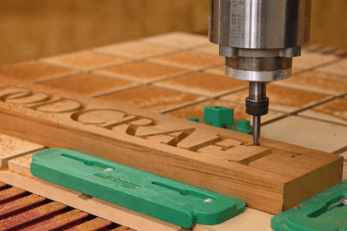
Woodworking has entered a new era. What once required years of hands-on skill to master can now be complemented — or even accelerated — with a desktop CNC router. Whether you want to carve intricate furniture details, cut custom joints, or produce decorative panels, a CNC router brings precision and repeatability that hand tools simply cannot match. But with so many options on the market, choosing the right machine for your woodworking needs can feel overwhelming. This guide walks you through every factor that matters so you can make a confident, informed decision.
What Is a Desktop CNC Router and Why Do Woodworkers Need One?
A desktop CNC router is a computer-controlled cutting machine that uses a rotating spindle bit to remove material from a workpiece. Unlike a laser engraver that works on the surface, a CNC router cuts through material in three dimensions — enabling everything from simple profile cuts to complex 3D relief carvings.
For woodworkers, the appeal is clear: a CNC router can execute a design flawlessly every single time. Once you load a digital file, the machine handles the cutting — no slips, no inconsistencies, no wasted material. It turns your creative designs into real, physical objects with professional-grade precision.
Factor 1 — Work Area Size: Match the Machine to Your Projects
The work area, or cutting bed, is one of the first specs to check. It defines the maximum dimensions of the material you can work with. If you plan to cut full cabinet panels or large tabletop pieces, you need a machine with a generous work area. For smaller decorative items, signs, or jewelry boxes, a compact cutting bed is perfectly sufficient.
Common work area sizes for desktop CNC routers include:
- 3018 (300mm x 180mm) — suitable for small hobby projects and engraving
- 4040 (400mm x 400mm) — a versatile mid-range option for most woodworking tasks
- 6050 (600mm x 500mm) — handles larger panels and more ambitious projects
- TTC-450 Pro range — designed specifically for serious woodworking with an optimized cutting zone
Always think about your most common project size before buying. A machine that is too small will limit your work, while an unnecessarily large machine takes up workspace and costs more than needed.
Factor 2 — Spindle Power: The Heart of the Machine
The spindle is the motor that drives the cutting bit. Spindle power is measured in watts, and it directly affects what materials you can cut and how quickly you can work. For general woodworking, a spindle of at least 300W to 500W handles softwoods and MDF comfortably. For hardwoods like oak, walnut, or maple, you will want 800W or more to maintain speed without bogging down.
A more powerful spindle also runs cooler under load, which extends bit life and gives you cleaner cuts. Underpowered spindles struggle with harder materials, creating rough edges and burning the wood surface. When in doubt, go with more power — it gives you room to grow.
Factor 3 — Frame Rigidity: Why It Matters More Than You Think
A rigid frame is essential for precision woodworking. Any flex or vibration in the machine frame translates directly into your cuts — causing wavy lines, uneven depths, and misaligned passes. The best desktop CNC routers use thick aluminum extrusions or steel frames that remain stable even under heavy cutting loads.
Avoid machines with primarily plastic structural components if you plan to do serious woodworking. Plastic frames are fine for light engraving but will wobble when you push the machine harder. Aluminum frames cost more but deliver dramatically better results over the long term.
Factor 4 — Z-Axis Travel: The Key to 3D Carving Depth
The Z-axis determines how deep your machine can cut in a single pass and how thick a piece of material it can accommodate. For flat 2D profiling, even a modest Z-axis travel is enough. But if you want to create 3D relief carvings, decorative panels, or bowl blanks, you need sufficient Z clearance to both position thick material and carve deeply into it.
Check both the maximum material thickness the machine can hold AND the total travel range of the Z-axis. These are two separate figures and both matter for woodworking applications.
Factor 5 — Software Compatibility and Ease of Use
Your CNC router is only as useful as the software driving it. For woodworkers, the most commonly used software includes:
- VCarve Pro / Aspire (Vectric) — industry-standard for woodworking CNC; excellent for 3D carving and sign making
- Fusion 360 — powerful CAD/CAM software ideal for more technical parts and joinery
- Easel (Inventables) — beginner-friendly, browser-based option for simpler projects
- Candle / GRBL Controller — lightweight open-source controllers compatible with most entry-level machines
Before buying a machine, confirm which software it supports and whether the manufacturer provides tutorials, post processors, or customer support to help you get up and running quickly.
See also: How Technology Improves Productivity and Efficiency
Factor 6 — Bit Compatibility and Cutting Tool Options
CNC routers use interchangeable bits, and the type of bit you use dramatically changes the result. Common bit types for woodworking include:
- Straight bits — for general cutting and pocketing
- V-bits — ideal for engraving text, signs, and decorative lettering
- Ball nose bits — used for smooth 3D surface finishing and curved relief work
- Spiral upcut/downcut bits — control chip ejection and surface finish quality
- Surfacing bits — flatten rough stock or spoilboard surfaces quickly
Check that your machine uses a standard collet size (typically 1/4 inch or 6mm) so you have access to a wide range of affordable bits from multiple suppliers.
A Recommended Option: The TTC-450 Pro for Woodworkers
Among the desktop CNC options available for serious hobbyists and professionals alike, the TTC-450 Pro CNC router stands out as a well-rounded machine built with woodworkers in mind. It features a robust aluminum frame for rigidity, a capable spindle for cutting through hardwood and softwood alike, and a work area that comfortably accommodates mid-sized woodworking projects without requiring a dedicated workshop floor space.
Its design prioritizes stability and repeatability — two qualities that separate a reliable production tool from a frustrating hobby machine. Whether you are cutting dovetail joints, carving decorative inlays, or producing batches of custom wooden signs, the TTC-450 Pro delivers consistent results that hold up to professional scrutiny.
Budget vs. Performance: Finding the Right Balance
Desktop CNC routers span a wide price range — from under $200 for basic hobbyist kits to over $1,500 for professional-grade machines. Here is a general breakdown of what to expect at each price tier:
- Under $300: Basic machines suitable for light engraving and soft materials. Limited rigidity, smaller work areas, and basic software support.
- $300–$700: Mid-range machines with aluminum frames, better spindles, and more reliable motion systems. Good starting point for woodworking hobbyists.
- $700–$1,500: Performance machines with larger work areas, powerful spindles, and strong community and manufacturer support. Suitable for regular woodworking projects.
- $1,500+: Professional desktop machines with industrial-grade components, advanced features, and premium support for production-level work.
Do not buy the cheapest machine available if woodworking is your serious hobby or business. A slightly higher investment upfront saves you from the frustration of poor cuts, constant recalibration, and premature replacement.
Where to Find Quality CNC Machines and Resources
Choosing the right supplier matters as much as choosing the right machine. You want a manufacturer that provides comprehensive documentation, responsive customer support, firmware updates, and a growing library of tutorials. Two Trees 3D machines are built with this philosophy in mind — the brand has developed a strong reputation among makers and woodworkers for offering well-built desktop fabrication tools backed by solid customer support and an active user community.
Beyond hardware, the knowledge base, setup guides, and project inspiration available from your machine’s manufacturer can be the difference between a steep learning curve and a smooth onboarding experience. Always factor in post-purchase support when evaluating any CNC router.
Final Thoughts: The Right CNC Router Transforms Your Woodworking
Buying a desktop CNC router is one of the most impactful upgrades a woodworker can make. The right machine opens up possibilities that were previously reserved for large workshops and expensive industrial equipment — all from the comfort of your own space. Focus on work area, spindle power, frame rigidity, Z-axis travel, and software compatibility, and you will find a machine perfectly matched to your ambitions.
Take your time comparing options, read real user reviews, and do not be afraid to start with a mid-range machine. With the right tool in your workshop, the only limit is your imagination.